booting lab…
45% Keyboard — Patrick Fan×
← Back
https://patrick-fan.com/projects/keyboard45
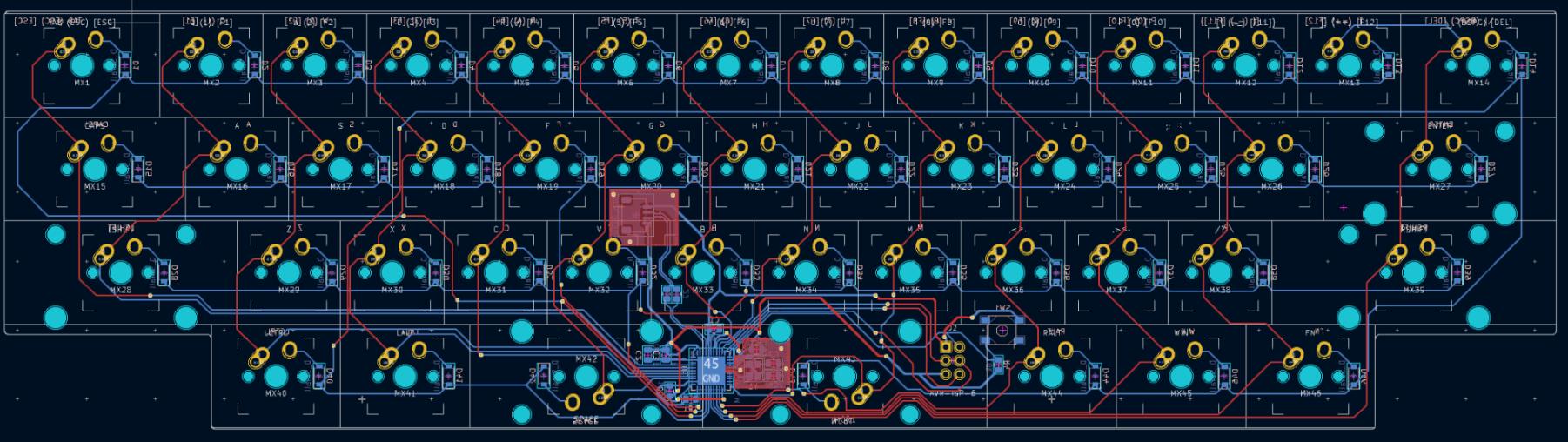
45% Keyboard screenshot
  • PCB designed in KiCad, SMDs hand-soldered
  • Aluminium case CNC-machined from my own CAM setup
  • Custom QMK-based firmware brings it to life

What it is

A fully custom 45% mechanical keyboard, built solo from bare components to a working daily tool. Every layer is mine: the PCB designed in KiCad, the case CNC-machined from aluminium, the SMD components hand-soldered, and the firmware written to tie it all together.

The build

The 45% form factor squeezes a full typing experience into a board smaller than a compact 60% — which means the matrix, controller placement and case geometry all had to be worked out from scratch. CAM toolpaths for the case were programmed and machined as part of the project.
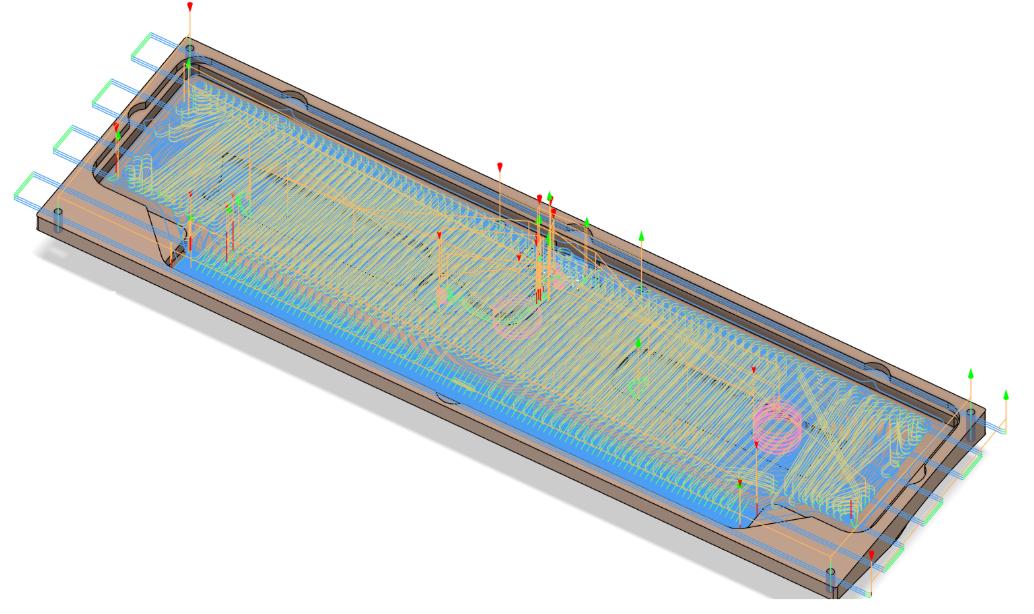
CAM toolpaths over the keyboard case model
CAM: the case machining toolpaths, programmed from scratch.
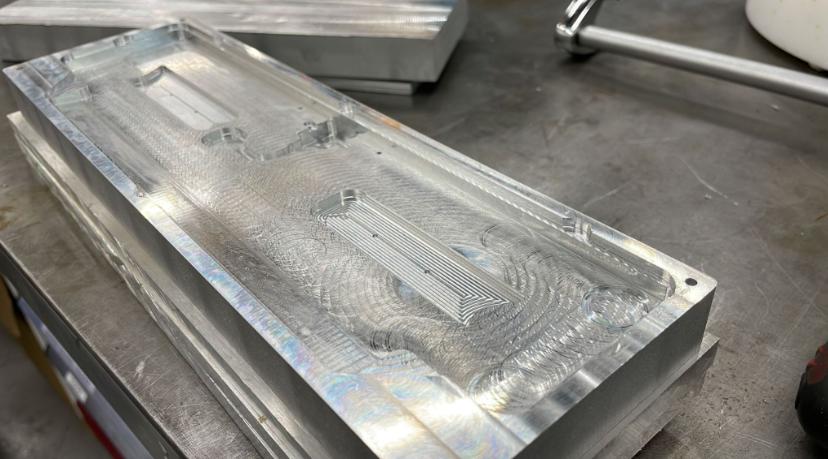
CNC-machined aluminium keyboard case on the workshop bench
Fresh off the CNC: the aluminium case, still showing its toolmarks.

KiCadCNC machiningSMD solderingQMK firmwareCAD/CAM

Done — keyboard45.html loaded
Nothing Playground — Patrick Fan×
← Back
https://patrick-fan.com/projects/playground
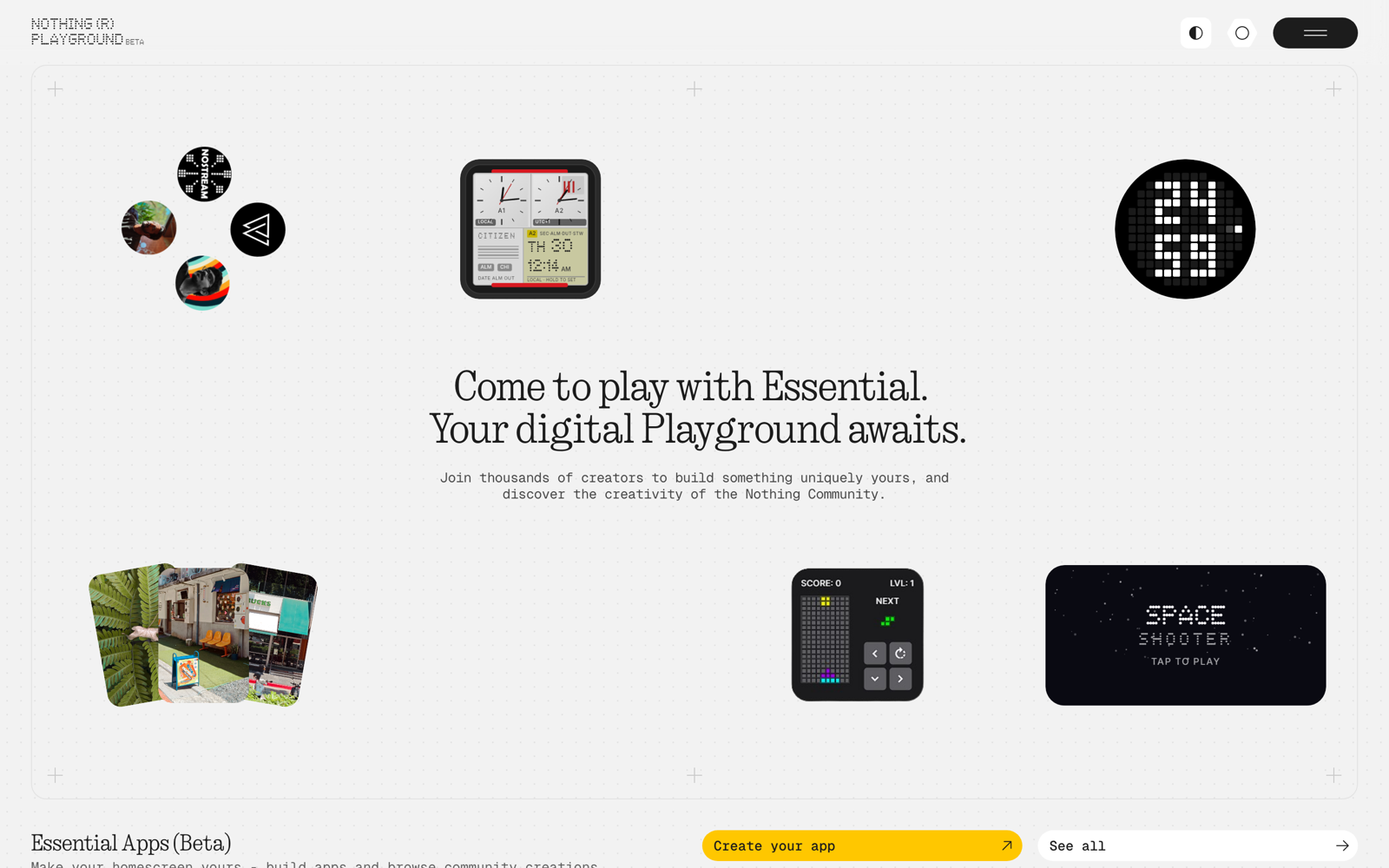
Nothing Playground screenshot
  • Describe a widget in chat — it builds, deploys to your phone
  • 112 merged PRs across web, backend, Android app, and infra
  • Built the usage/credits system, observability, beta onboarding

What it is

Nothing Playground is Nothing's AI widget-builder: describe an app or widget in plain language and it gets built, previewed, and deployed to your phone's home screen — then shared with the community for others to install and remix. It shipped publicly with Nothing OS 4.0.

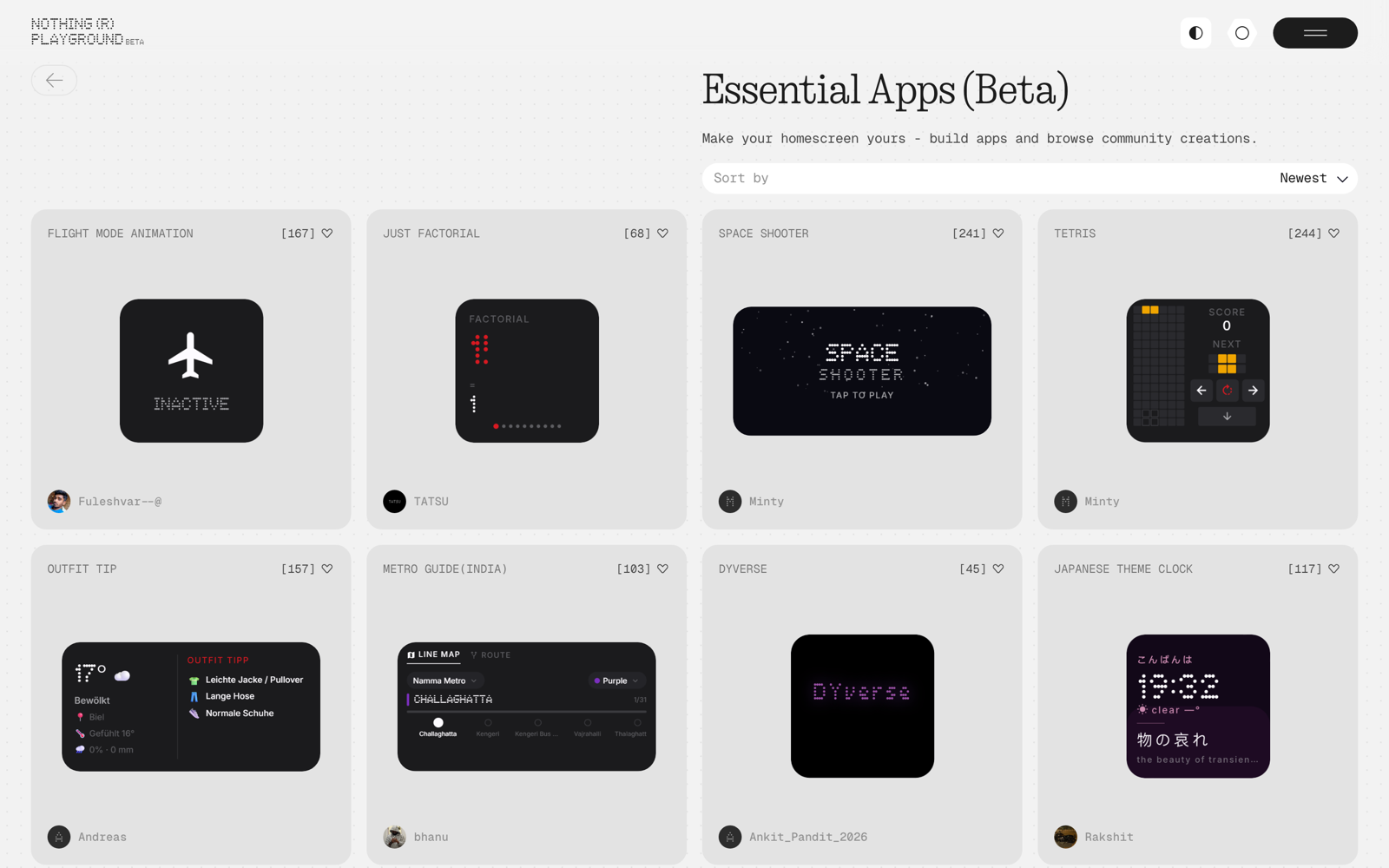
Essential Apps gallery on playground.nothing.tech showing community-built widgets
The community gallery: Tetris, transit maps, weather outfit tips — all built by users in chat.

What I built

I worked across the whole platform — web, backend, the Android builder app, and the infrastructure underneath — from before the beta to well past launch: 112 merged PRs across the product's three repos.

  • Usage metering & credits — the billing system end to end: schema and migrations, the charge/gate services, rate-limit handling in the API, token pricing, and the usage UI in both the web app and the Android builder.
  • Android builder app — the widget snapshot pipeline that captures on-device thumbnails and syncs them to the backend, plus Figma-matched share cards for posting creations to the sharesheet.
  • LLM serving reliability — provider failover with regional round-robin and exponential backoff so widget builds survive capacity spikes, load-tested end to end.
  • Product observability — distributed tracing with LLM-call instrumentation, browser and mobile session telemetry, and funnel and cost dashboards (build failure rates, deploy tracking, token usage).
  • Beta onboarding pipeline — turned a manual process into an automated invite → survey → whitelist flow in the admin dashboard, with batch emails and a background job keeping the community beta group in sync.
  • CI/CD & cloud infrastructure — Terraform-managed infra, secrets management, release tooling for signed Android builds, and a CI overhaul that builds only the apps a change touches and parallelizes rollouts.

Try it

Browse community-built apps at the live site — or build your own if you have a Nothing phone.

TypeScriptPython / FastAPIKotlin / ComposeTerraformAWSDatadogPostgres

Done — playground.html loaded
BLE Recorder — Patrick Fan×
← Back
https://patrick-fan.com/projects/blerecorder
BLE Recorder screenshot
  • One mechanical key: press to record, press to send
  • nRF52840 firmware streams ADPCM audio over BLE
  • Android + iOS apps, custom enclosure — every layer mine

What it is

A pocket voice recorder that is just one mechanical key. Press it and the onboard mic starts recording; press again and the audio lands on your phone as a WAV file. No screen, no pairing dance — the link stays connected and reconnects on its own.

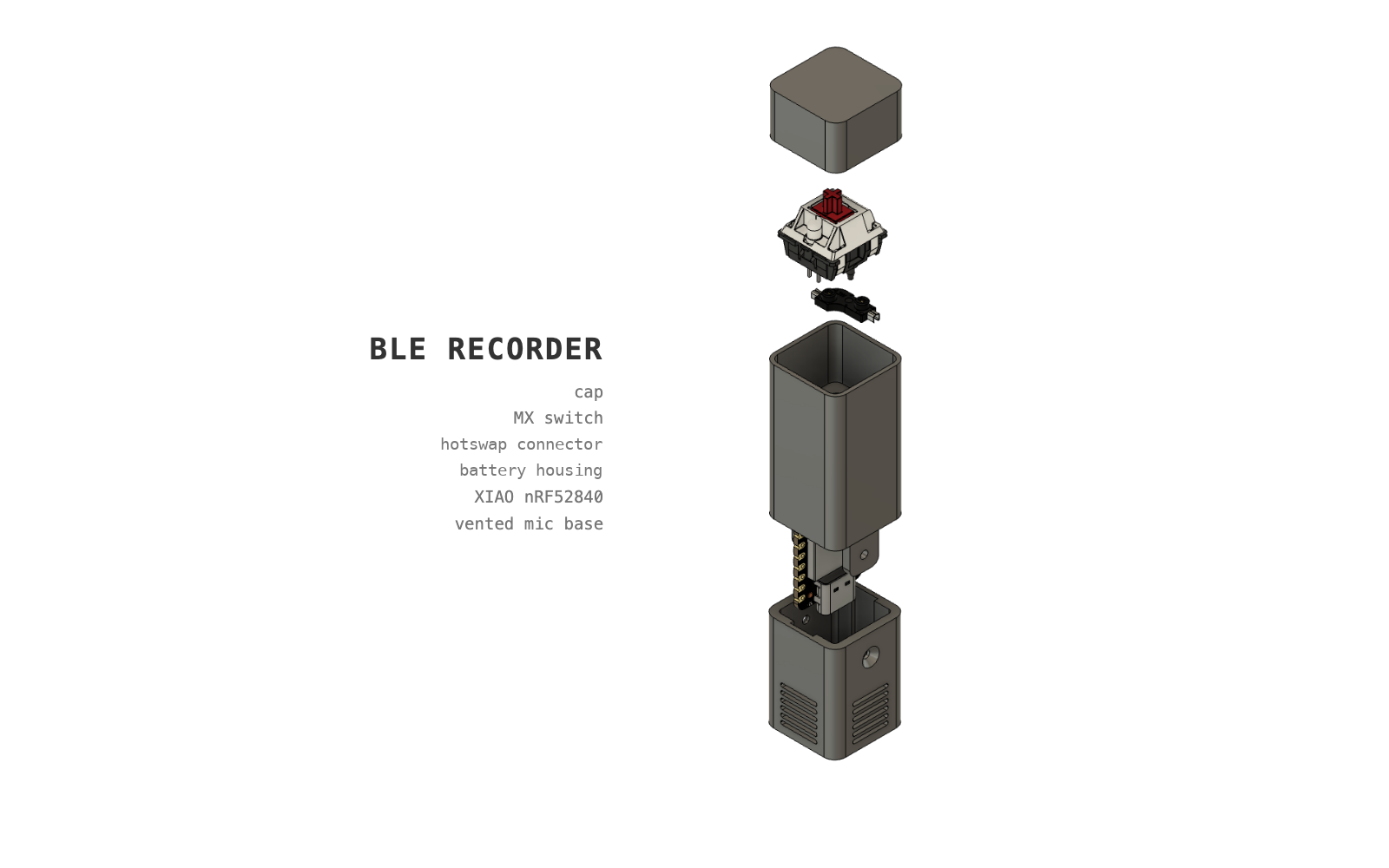
Every layer is custom: the firmware on a Seeed XIAO nRF52840 Sense, the BLE audio protocol, the Android and iOS companion apps, and the 3D-printed enclosure around a single MX-style switch.

How it works

  • The PDM mic captures 16 kHz / 16-bit mono into a ring buffer via DMA; audio is IMA-ADPCM encoded and packetized on the wire.
  • Streaming rides BLE notifications on a 2M PHY link — MTU 247, 15 ms connection interval, ~34 packets per second.
  • The phone app reassembles the stream, checks for sequence gaps, writes WAV files as data arrives, and shows link quality and battery.
  • Runs off a 140 mAh LiPo charged over the same USB-C used for flashing — idle power mattered in every design decision.

nRF52840Embedded CBLEADPCMAndroidiOSCAD / 3D printing

Done — blerecorder.html loaded
Foodscape — Patrick Fan×
← Back
https://patrick-fan.com/projects/foodscape
Foodscape screenshot
  • Real London buildings re-skinned as their best restaurant's food
  • Voice agent flies the camera: “find me italian”
  • Autonomous agent keeps the food-city true to the real world

What it is

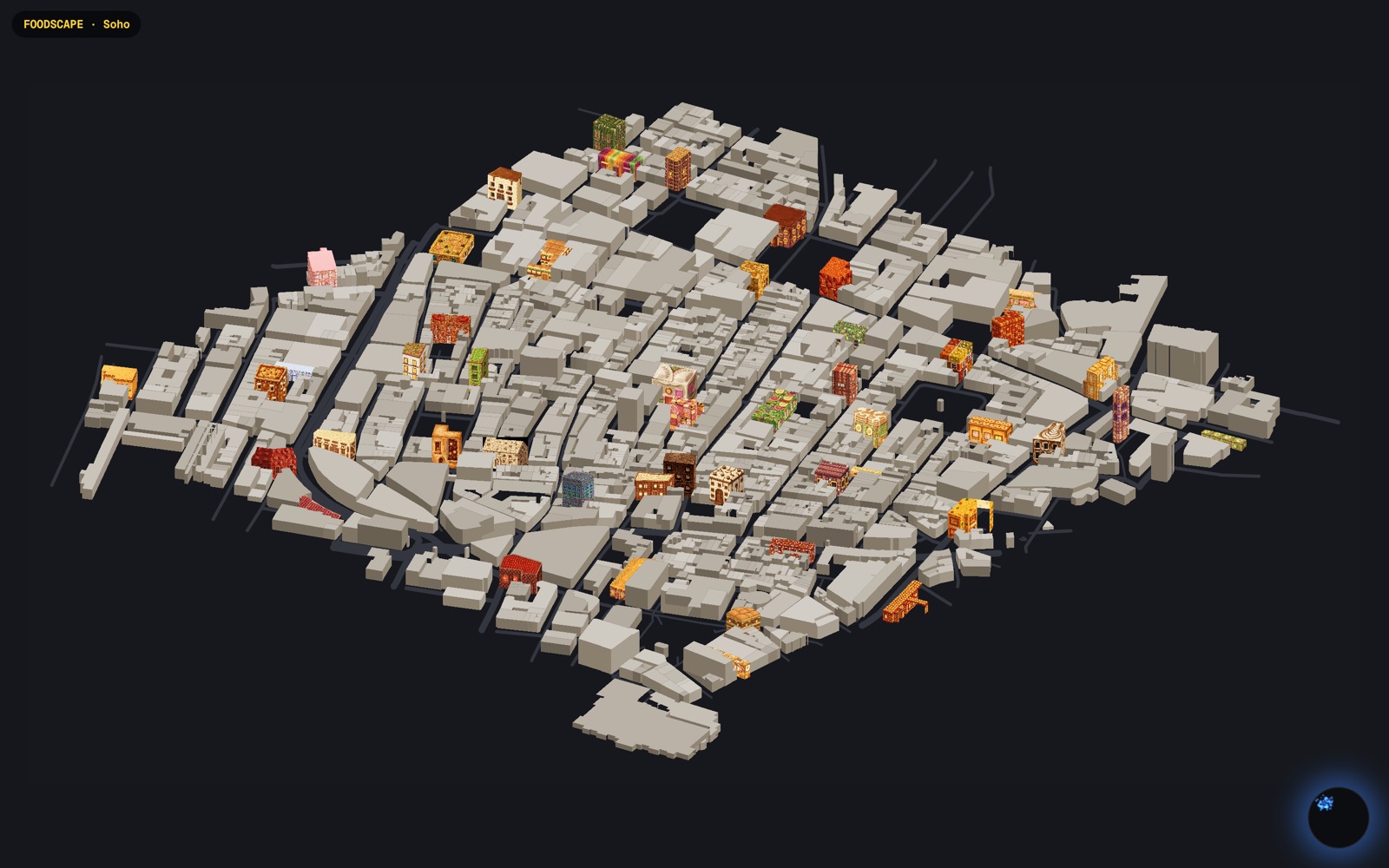
An isometric.nyc for London — built out of food. Every tile is the real building at that London spot (its actual massing, storeys, roofline, footprint) re-skinned in the signature food of the best restaurant there: a Soho townhouse rebuilt out of sushi, a Victorian terrace re-skinned as spaghetti, a railway arch made of tacos.

It is not a one-shot generator — an autonomous agent keeps the food-city true to the real world.

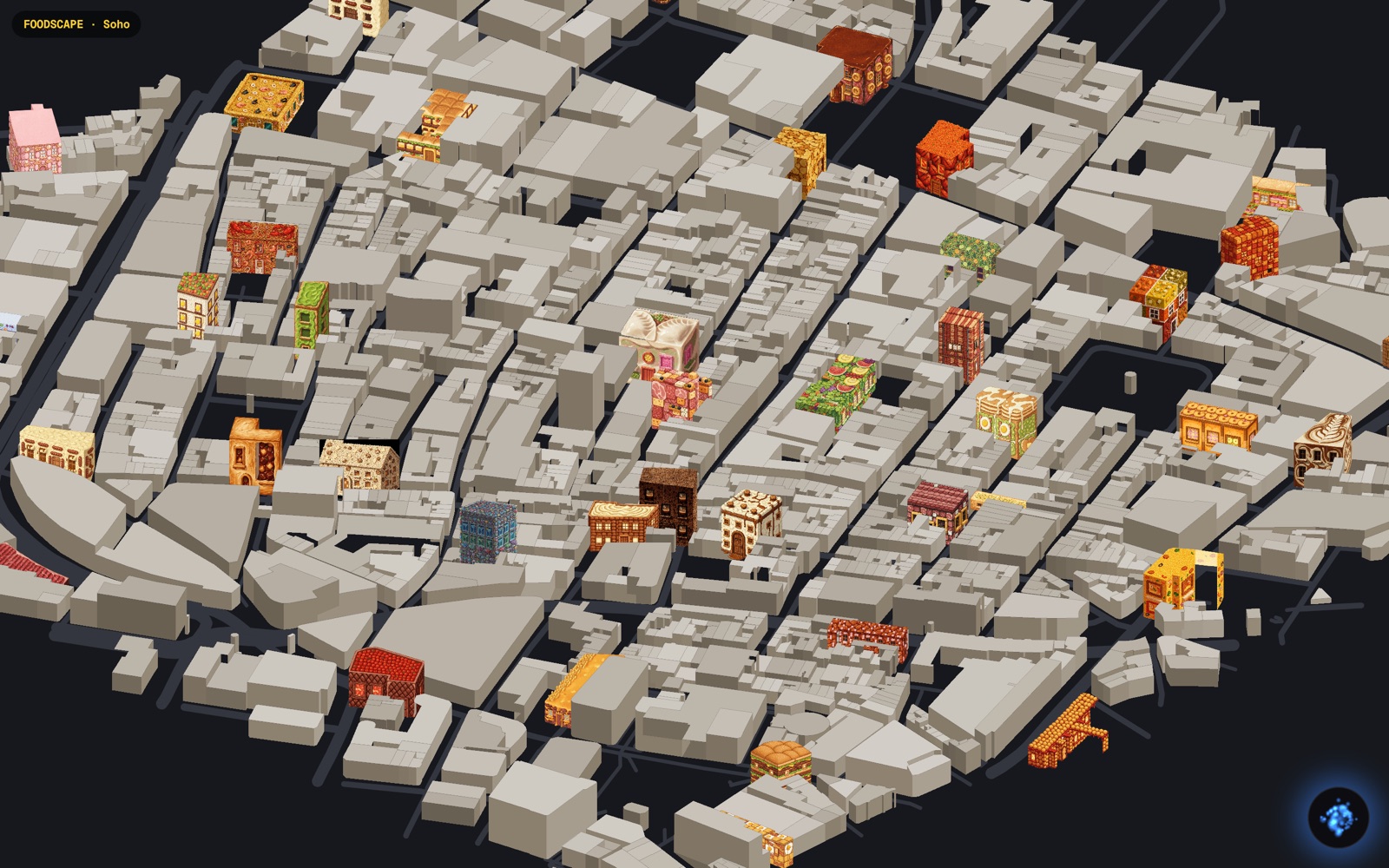
Zoomed view of Soho blocks with individual food buildings
Up close: each colored building is a real address wearing its best restaurant's dish.

Try it

Open the live site, click the glowing blue orb and say "find me italian" — the camera flies to the matches, rings them, and JARVIS answers out loud. Drag to pan, scroll to zoom.

TypeScriptVercelPixel artVoice agent

Done — foodscape.html loaded
On-Device AI Server — Patrick Fan×
← Back
https://patrick-fan.com/projects/on-device-ai
Stable Diffusion on the NPU at 512×512. I cut about 18 s of waiting.
Gemma 4 E4B chatting on the CPU. I cut about 8 s of cold model load and prompt reading.
Food scan. Gemma looks at the photo and guesses the nutrition. The analysis plays in real time.
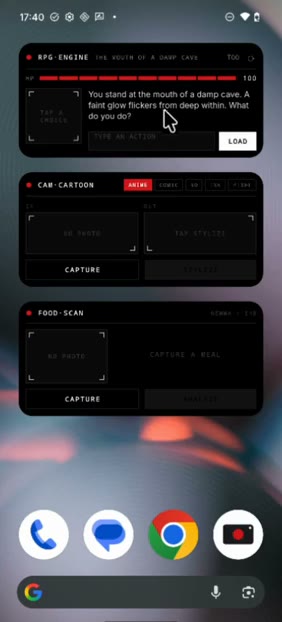
Home screen with an RPG widget, a cam-cartoon widget and a food-scan widget
Also on the home screen, an endless RPG with Gemma as the dungeon master and cam-cartoon, which restyles a photo.
  • One Android service holds every model, and apps call it over AIDL
  • Each model runs on whichever of the CPU, GPU or NPU suits it
  • Wrote my own C++ Stable Diffusion pipeline for the NPU on Qualcomm QNN

What it is

At Nothing I built an AI inference server that runs on the phone. Apps and home-screen widgets ask one background service to chat, look at a photo or generate an image, and the models run on the phone's own chips with no network connection. There's no cloud API bill per user, so AI features can go into free widgets.

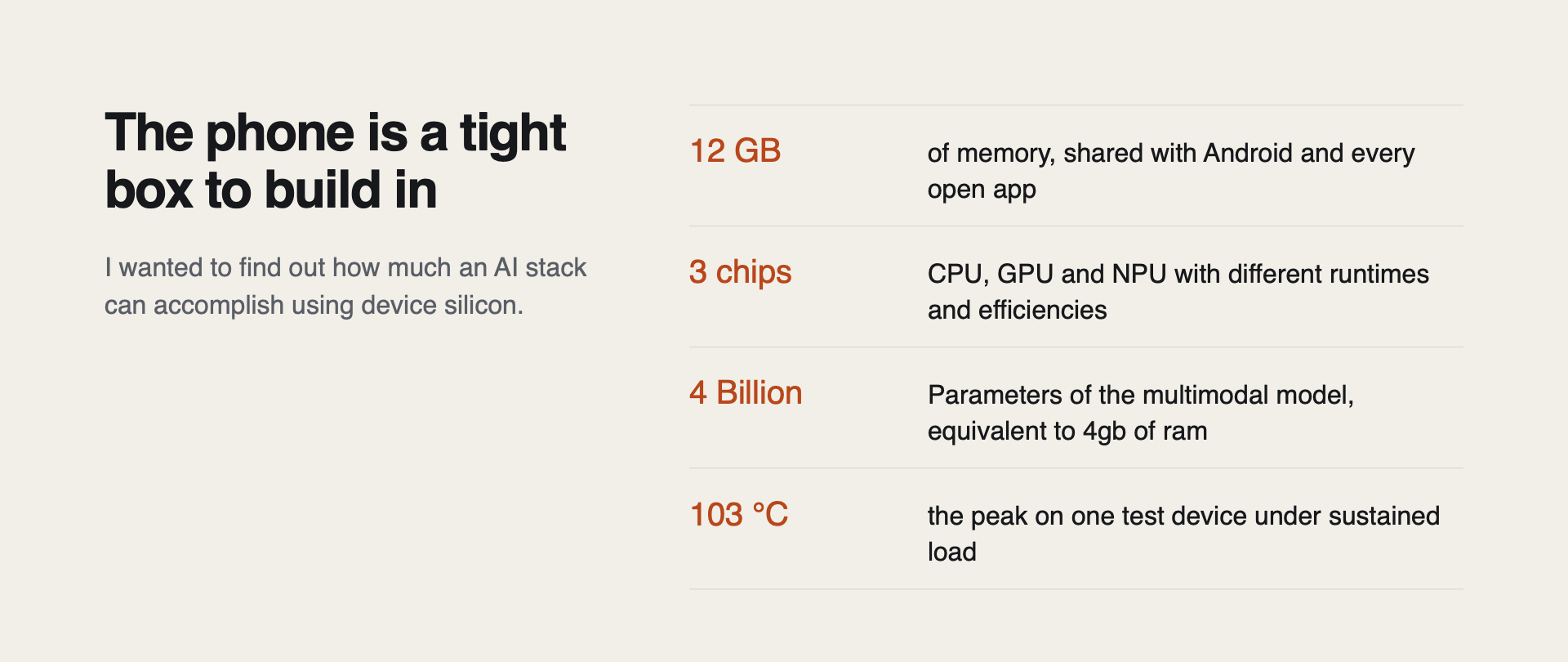
A phone is a small, low-power device to do this on. It has 12 GB of RAM, shared with Android and whatever else is open, and no active cooling. Gemma 4 E4B, the everyday model, has about 3.7 GB of weights, and it needs more memory than that once the KV cache starts to fill.

Slide: the phone is a tight box to build in. 12 GB of memory shared with Android, 3 chips, a 4-billion-parameter model, and a 103 °C peak on one test device

One service owns all the models

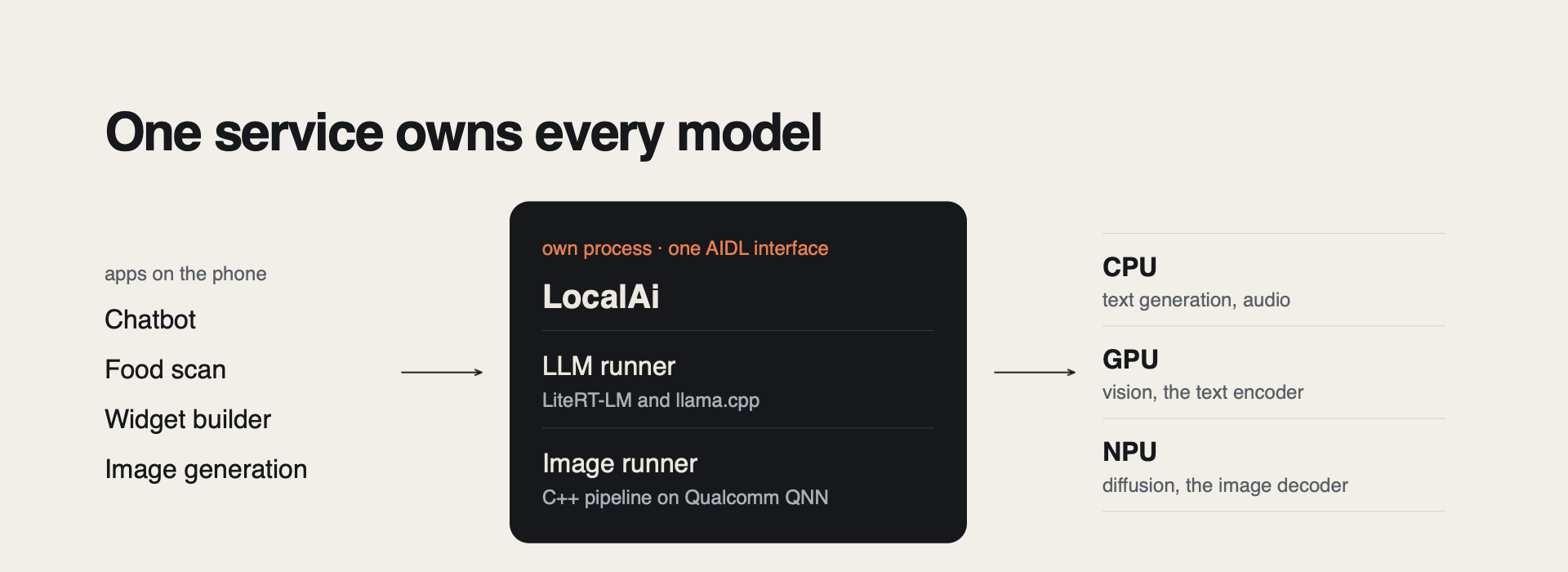
Diagram: chatbot, food scan, widget builder and image generation apps call one on-device AI service, which runs an LLM runner and an image runner and routes work to the CPU, GPU and NPU
From my talk slides.

The models run in their own background process, and apps reach it through a single AIDL interface. An app binds to the service and queues a job. It never loads a model and doesn't know which runtime does the work.

Native inference code can abort in ways you can't catch. If it crashes inside the service, the app only sees "service died" and reconnects. The app itself stays up. Having one service also means each model is in memory once, shared by every app, which avoids most out-of-memory kills on a 12 GB phone.

The phone's Snapdragon 8s Gen 4 has a CPU, a GPU and an NPU, and each suits different models. Text decoding and audio go to the CPU (XNNPACK). Vision and the CLIP text encoder use the Adreno GPU over OpenCL. The Stable Diffusion UNet and image decoder run on the Hexagon NPU through Qualcomm QNN.

I wrote the service and its LLM and image runners, plus the C++ image pipeline. The models and runtimes come from other people and are credited at the bottom of the page.

Image generation

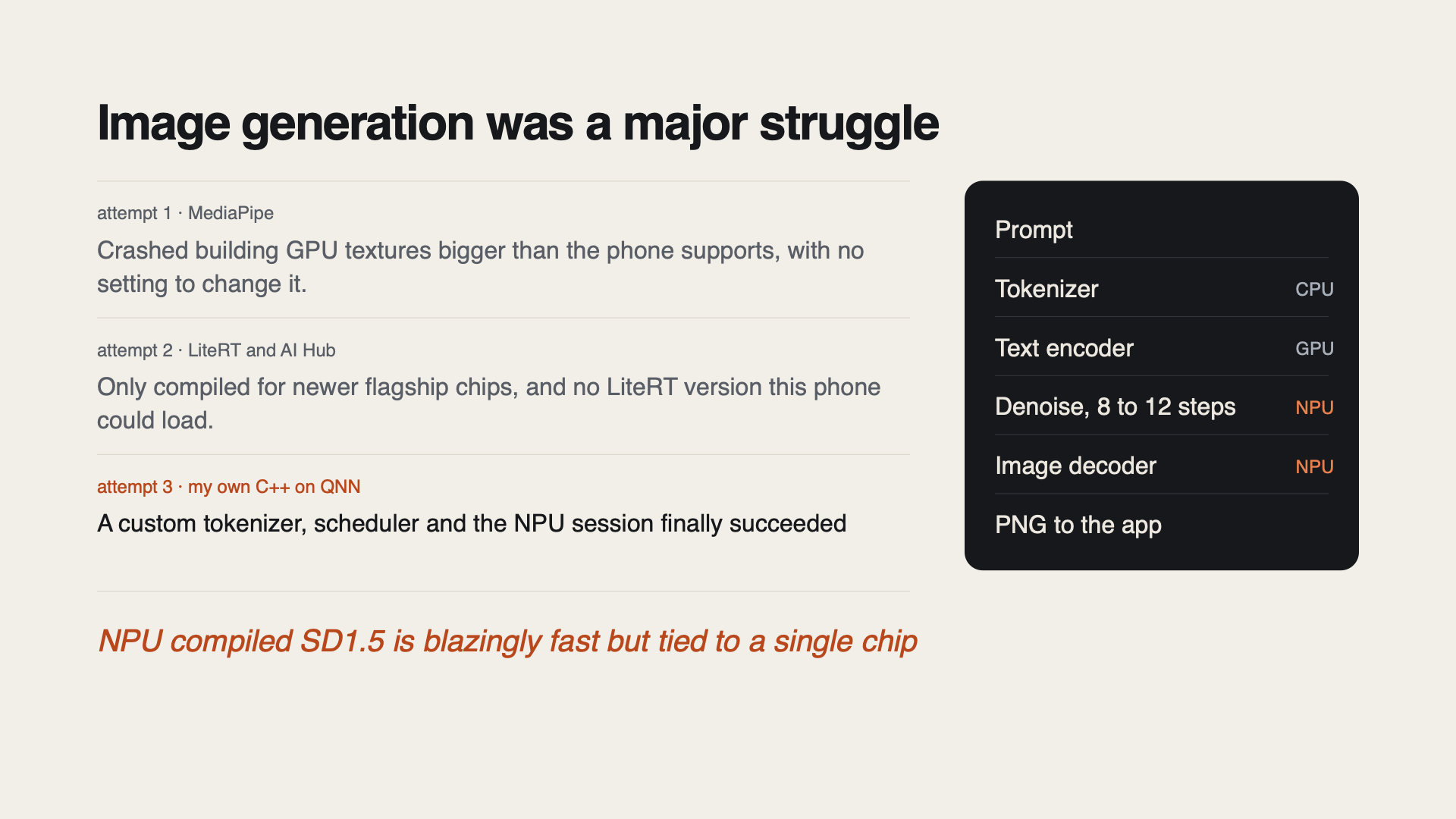
Slide: three attempts at on-device image generation, and the final pipeline from prompt to tokenizer, text encoder, NPU denoising, NPU image decoder and PNG

My first try was Google's MediaPipe image generator. It crashed because it asked for GPU textures wider than this phone's OpenCL limit, and there was no setting to change that.

Next I tried LiteRT with Qualcomm AI Hub's precompiled models. AI Hub only had Stable Diffusion compiled for newer flagship chips, not the one in this phone, and there was no LiteRT version I could load instead, so I couldn't configure my way around it.

The third try worked. I wrote my own pipeline in C++ on QNN, with a CLIP BPE tokenizer, a DPM-Solver++ scheduler, and the UNet and image decoder running as NPU sessions.

Memory was a problem here too. The UNet alone is about 840 MB, so the UNet and decoder take turns on the NPU, and one session is freed before the next loads. The finished PNG goes back to the app through a file-descriptor pipe. Binder's transaction buffer is only about 1 MB and easy to overflow under load, so I kept the image out of the binder call.

On the NPU, generation is fast enough to be usable. But the compiled model only loads on the chip revision it was built for, so it isn't portable.

Thermals

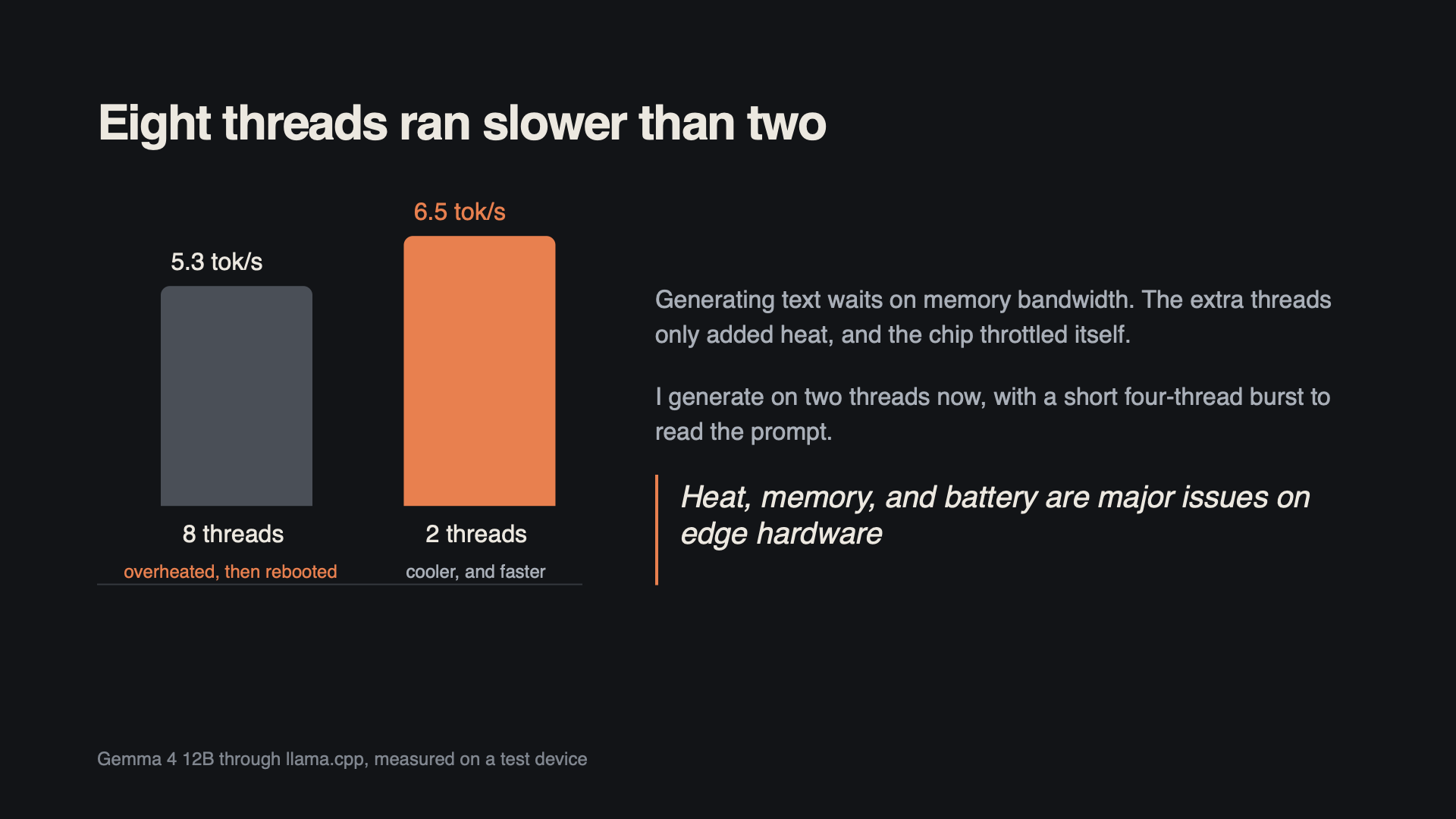
Bar chart: Gemma 4 12B through llama.cpp generated 5.3 tokens per second on 8 threads, then overheated and rebooted, and 6.5 tokens per second on 2 threads

The phone has no active cooling. I first ran Gemma 4 12B through llama.cpp on eight CPU threads, and a test device overheated until it rebooted. Two threads turned out faster, 6.5 tokens/s against 5.3.

Generating text mostly waits on memory bandwidth, and two threads were already enough to keep up with it. The extra threads only added heat, and the chip throttled itself.

Decoding now runs on two threads, with a short four-thread burst to read the prompt. Six threads had peaked at 103 °C on a long prompt.

There are two model sizes. Gemma 4 E4B handles quick answers and the 12B is for when you want more depth. A RAM check refuses to load the 12B on a phone with less than 12 GB.

Getting small models to write widgets

I built the client apps on top of the service too. Most of the work was getting a small model to reliably produce something a widget can render.

The model writes widgets in a small JSON component language with sparklines, bars, gauges and maps. That leaves far less to get wrong than free-form HTML. A repair pass fixes the usual drift, such as tool calls written in Gemma's native function-call syntax when the prompt asked for a different format. On the llama.cpp path, GBNF grammar-constrained decoding also masks invalid tokens while the model samples.

Many widgets share one model. At most three chat sessions stay live and the rest are parked as text. Anything a user asks goes ahead of background widget refreshes. In the voice assistant, EmbeddingGemma routes each request to one of 16 tools before the main model runs, so the tool's results are already in the prompt when it answers.

Trade-offs

WhereI choseIt cost
ProcessModels in a separate processA bit of latency and more moving parts
Image generationMy own C++ pipeline on the NPUOnly loads on the chip it was compiled for
ChatTwo model sizesThe simplicity of a single model
WidgetsA small JSON component languageFree-form layouts
OverallOn-device onlySome accuracy compared with cloud models

The lesson I'd keep is to measure before picking a setting. Eight threads looked like the obvious choice and turned out slower and hotter than two.

Credits

Thanks to the people behind these projects.

  • Gemma 4 (E4B and 12B) and EmbeddingGemma from Google
  • LiteRT-LM and LiteRT, which run Gemma 4 E4B
  • llama.cpp, which runs the 12B on the CPU
  • Qualcomm QNN for the UNet and image decoder on the Hexagon NPU
  • MNN (Alibaba) for the CLIP text encoder on the GPU, and XNNPACK on the CPU
  • Stable Diffusion 1.5, using the AbsoluteReality community fine-tune that xororz converted for QNN (CreativeML OpenRAIL-M license)

KotlinC++ / JNIAndroid AIDLQualcomm QNNLiteRT-LMllama.cppOpenCLGemma 4

Done — on-device-ai.html loaded
Wing Flutter Control — Patrick Fan×
← Back
https://patrick-fan.com/projects/flutter-wing
Wing Flutter Control screenshot
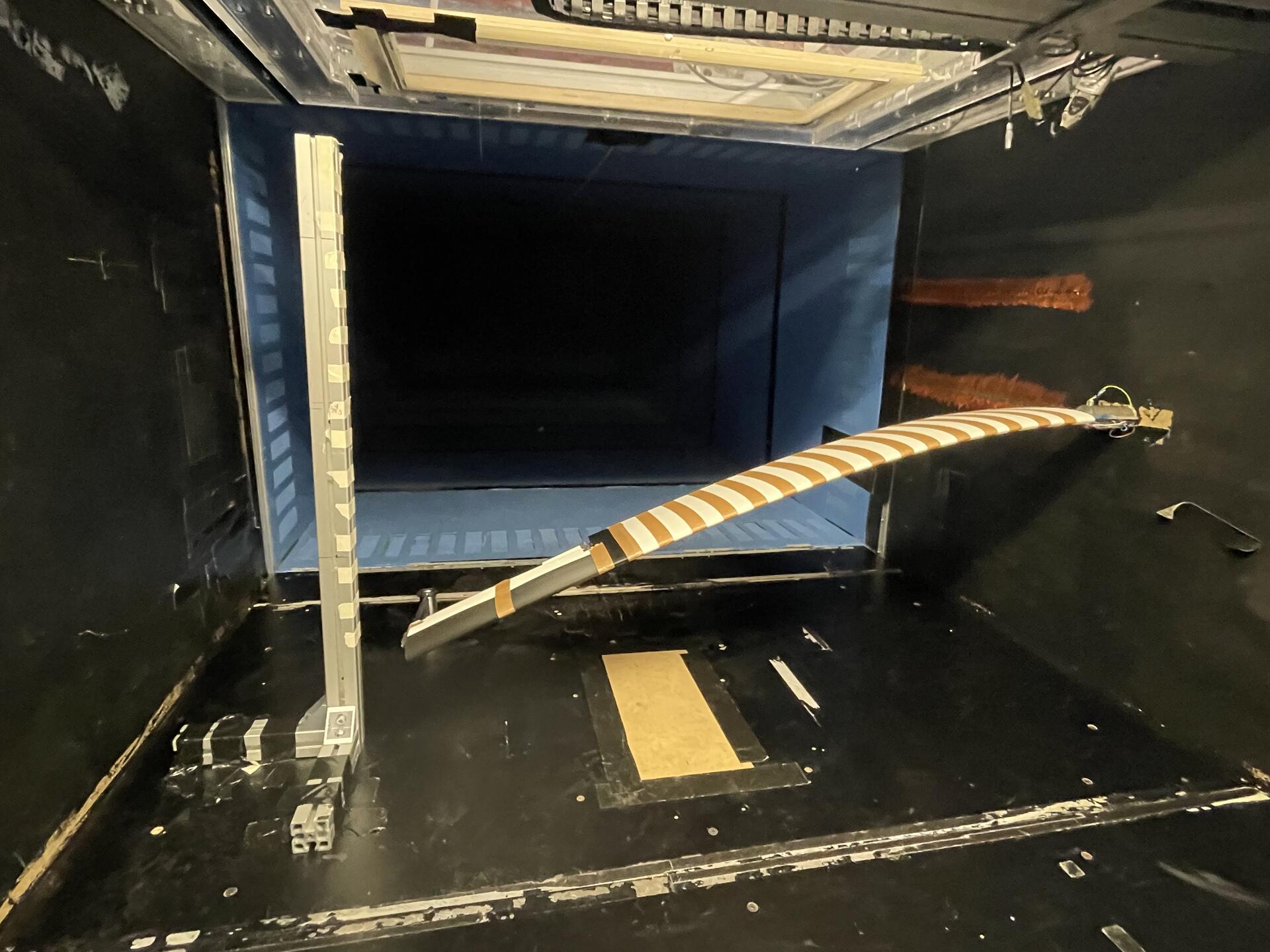
  • 1.2 m flexible wind-tunnel wing, simulated in SHARPy then built for real
  • ESP-32 closes the loop over an accelerometer and load cell
  • Active control cut flutter oscillations by 40%

What it is

My final-year masters project at Imperial College London (Oct 2024 – Jun 2025): stopping a flexible wing from shaking itself apart. Flutter is the aeroelastic instability where aerodynamic forces and a wing's own structural dynamics feed each other until the oscillation grows — and the fix was to sense it and actively fight it in real time.

I simulated and designed the wing in SHARPy, an open-source aeroelastic solver, then built and tested a fully functional 1.2 metre wind tunnel model around it.

The build

The model wing carries an integrated accelerometer and load cell, read and acted on by an ESP-32 running the control loop. In the wind tunnel, the closed-loop controller reduced flutter oscillations by 40%.

SHARPyPythonESP-32Embedded systemsWind tunnel testing

Done — flutter-wing.html loaded
Layout Learner — Patrick Fan×
← Back
https://patrick-fan.com/projects/layout-learner
Layout Learner screenshot
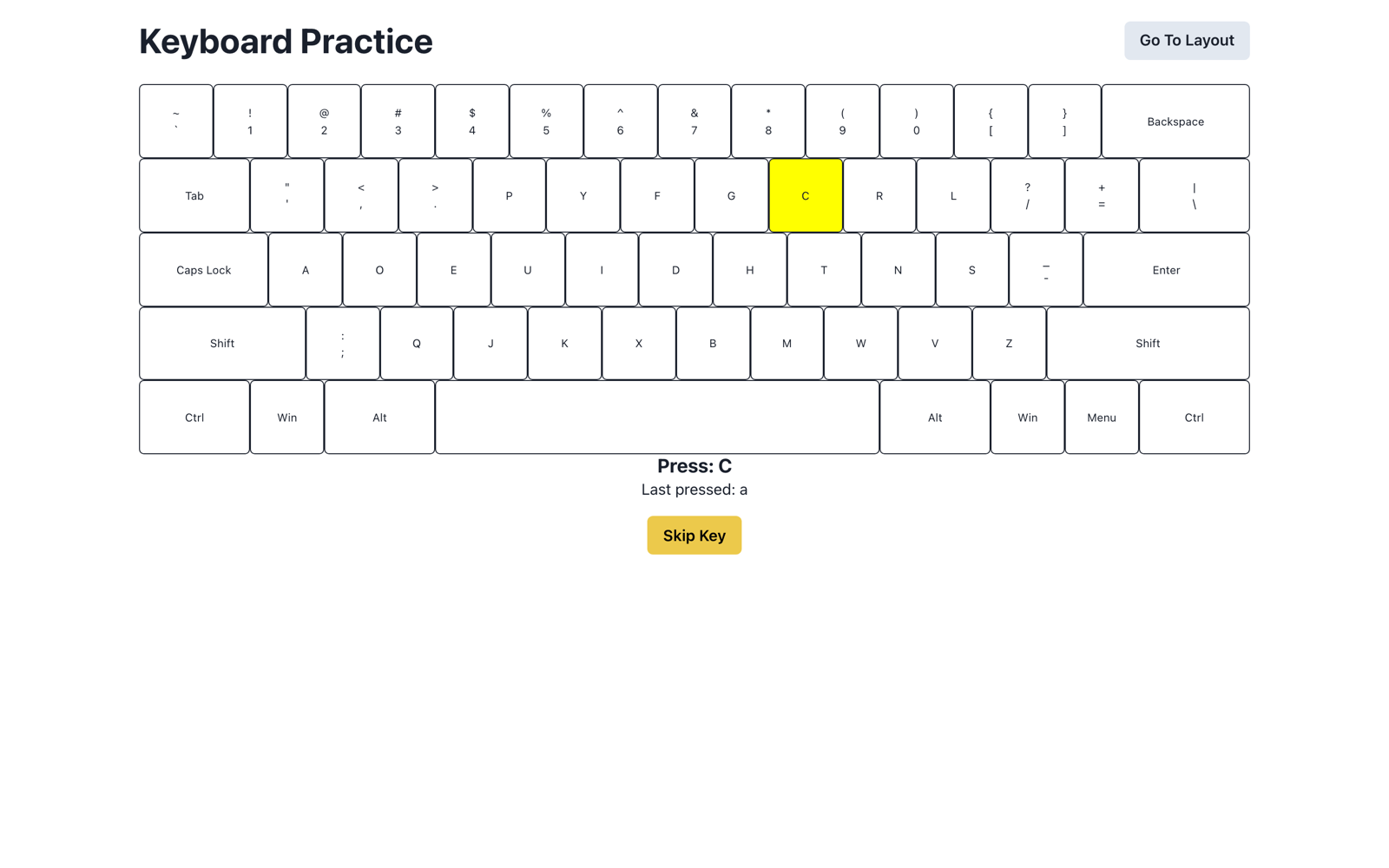
  • Guided drills for alternate keyboard layouts
  • On-screen keyboard shows what your fingers should do
  • Live on Vercel

What it is

A web application that helps anyone learn alternate keyboard layouts and shortcuts — guided, in the browser, with an on-screen keyboard that shows what your fingers should be doing.

Why

Switching layouts (Colemak, Dvorak, or a custom split-board setup) has a brutal cold-start. Layout Learner shortens it with focused drills instead of raw typing tests.

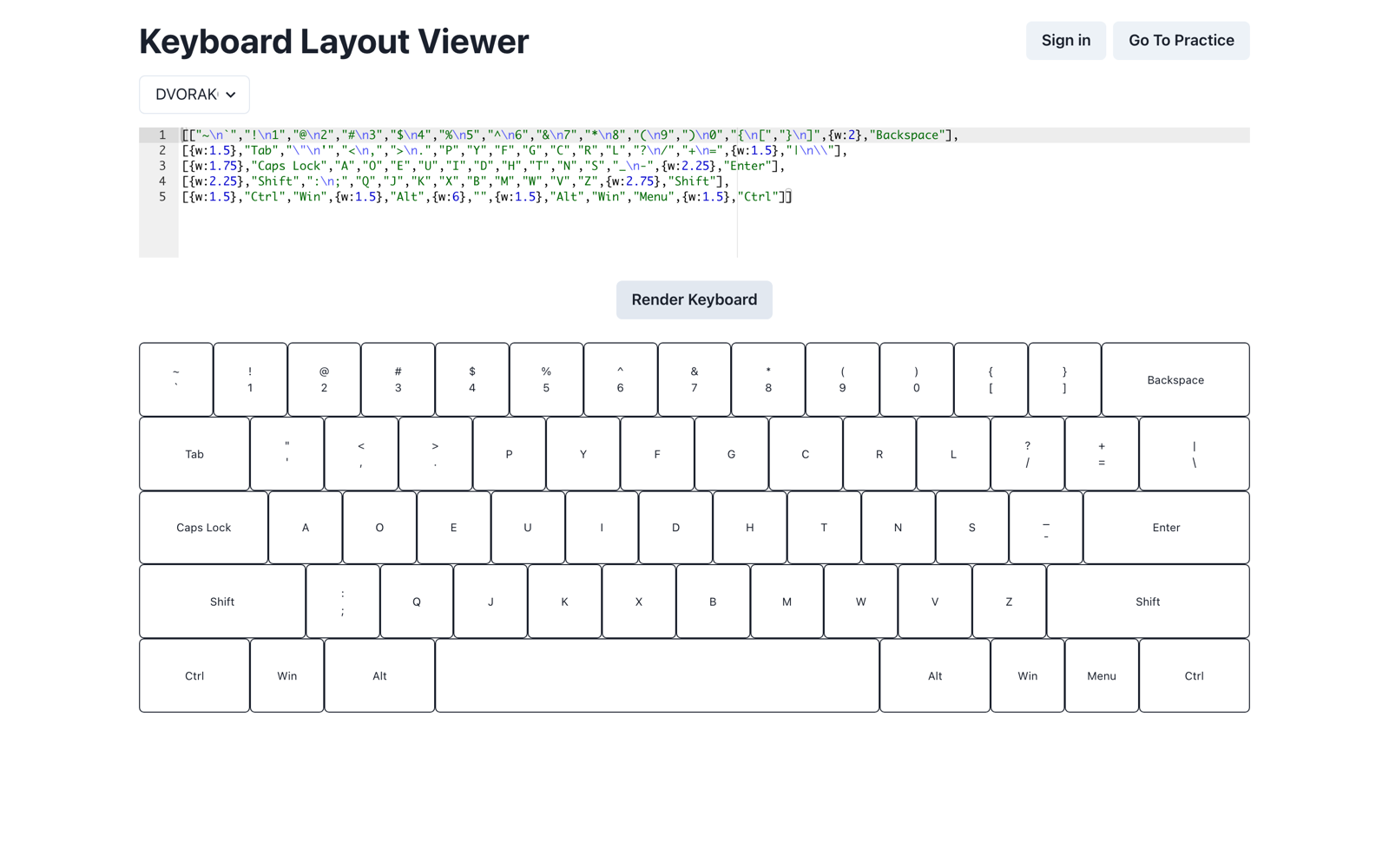
Define any layout

Layout viewer rendering a Dvorak keyboard from a JSON definition
Layouts are plain JSON — paste one (or pick a preset) and the viewer renders the board you'll drill on.

TypeScriptReactVercel

Done — layout-learner.html loaded

Patrick Fan — Room 240 Project Portfolio